Import ConVoid Families
ConVoid requires specific Revit families in your project to create and display openings. Without them, ConVoid cannot run. The families are installed with ConVoid at \Documents\conclass\Revit Content\%year%\%language% and are available in English, German, French, Spanish, Portuguese (Brazilian), Italian, Polish, and Czech for Revit 2023-2027. If missing, download them here.
Required Families
- Builders Work Openings (required)
- Structural Openings (optional)
- Polygonal Openings (optional)
- CC Horizontal Opening Circular
- CC Horizontal Opening Rectangle
- CC Horizontal Recess Circular
- CC Horizontal Recess Rectangle
- CC Vertical Opening Circular
- CC Vertical Opening Rectangle
- CC Vertical Recess Circular
- CC Vertical Recess Rectangle
- CC Structural Opening - Door
- CC Structural Opening - Window
Polygonal families allow free-form openings with 3 to 12 sides. These are placed manually and are available for both horizontal (wall) and vertical (floor/roof) orientations. Import only the variants you need from the ConVoid library.
- CC Horizontal Polygonal 3 Pt. to 12 Pt.
- CC Vertical Polygonal 3 Pt. to 12 Pt.
How to Import the Families
- Via ConVoid
- Manual Import in Revit
ConVoid detects missing families automatically when you start Convert Void. A dialog asks you to import them:
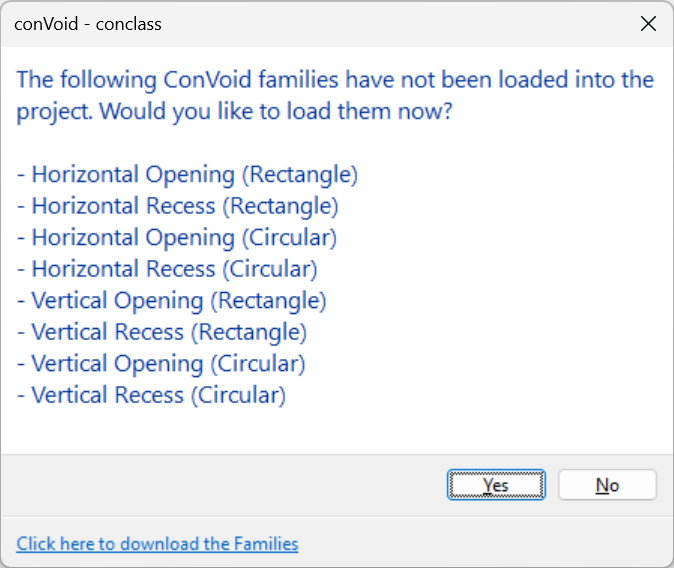
- Click [Yes] when prompted.
- The ConVoid library folder opens.
- Select and import all listed families into your project.
For Workflow C (Doors and Windows), no automatic prompt appears. Import the structural opening families manually before starting ConVoid.
You can also load the families manually at any time via Revit's built-in family loading:
- Go to the Insert tab in the Revit ribbon.
- Click Load Family.
- Navigate to the ConVoid family folder. If missing, download them here.
- Select the required
.rfafiles and click Open. - If a family with the same name already exists, Revit asks whether to overwrite. Choose Overwrite the existing version to update it.
Always ensure you load families with the correct language. If you accidentally load the wrong language, the only way to undo this is by pressing Ctrl+Z immediately. Fixing it afterwards is not straightforward.
Verify Your Import
Check the Revit Family Browser after importing. Every ConVoid family must show a "+" sign, confirming that at least one type is loaded.
A family without a "+" sign has no types loaded. Delete it and reload from the ConVoid library. ConVoid will not work with incomplete families.